Architect Peter Panholzer coined the term “squircle” in the summer of 1966 while working for Gerald Robinson. Robinson had seen a Scientific American article on the superellipse shape popularized by Piet Hein and suggested Panholzer use the shape in a project.
Piet Hein used the term superellipse for a compromise between an ellipse and a rectangle, and the term “supercircle” for the special case of axes of equal length. While Piet Hein popularized the superellipse shape, the discovery of the shape goes back to Gabriel Lamé in 1818.
You can find more on the superellipse and squircle by following these links, but essentially the idea is to take the equation for an ellipse or circle and replace the exponent 2 with a larger exponent. The larger the exponent is, the closer the superellipse is to being a rectangle, and the closer the supercircle/squircle is to being a square.
Panholzer contacted me in response to my article on squircles. He gives several pieces of evidence to support his claim to have been the first to use the term. One is a letter from his employer at the time, Gerald Robinson. He also cites these links.
Optimal exponent
As mentioned above, squircles and more generally superellipses, involve an exponent p. The case p = 2 gives a circle. As p goes to infinity, the squircle converges to a square. As p goes to 0, you get a star-shape as shown here. As noted in that same post, Apple uses p = 4 in some designs. The Sergels Torg fountain in Stockholm is a superellipse with p = 2.5. Gerald Robinson designed a parking garage using a superellipse with p = e = 2.71828.
Panholzer experimented with various exponents and decided that the optimal value of p would be the one for which the squircle has area half way between the circle and corresponding square. The average area criterion is intellectually satisfying, but also aesthetically satisfying. Panholzer said he first tried p = π, but he did not like the aesthetics of this choice.
The area of the portion of the unit circle contained in the first quadrant is π/4, and so we want to find the exponent p such that the area of the squircle in the first quadrant is (1 + π/4)/2. This means we need to solve
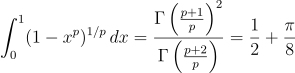
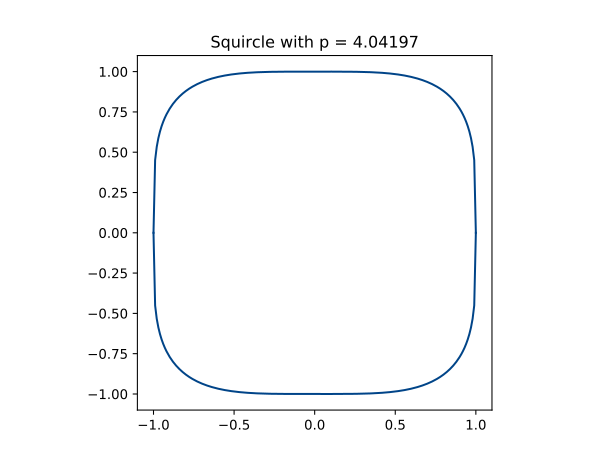
We can solve this numerically with the Python code below to find p = 4.04197. Interestingly, this is very close to the value p = 4 which Apple uses.
Sometime around 1966 Panholzer had a conference table made in the shape of a squircle with this exponent.
Computing
I asked Panholzer how he created his squircles, and whether he had access to a computer. He did use a computer to fnd the optimal value of p; his brother in law, Hans Thurow, had access to a computer at McPhar Geophysics in Toronto. But he drew the plots by hand.
There was no plotter around at that time, but I used transparent vellum over “Millimeterpapier” and my architectural drawing skills with “French curves” to draw 15 squircles from p=2.6 (obviously “circlish”) to p=4.0 (obviously “squarish”).

from John D. Cook https://ift.tt/2HTY2zx
via IFTTT
Comments
Post a Comment