
Angles in the spiral of Theodorus

The previous post looked at how to plot the spiral of Theodorus shown below.
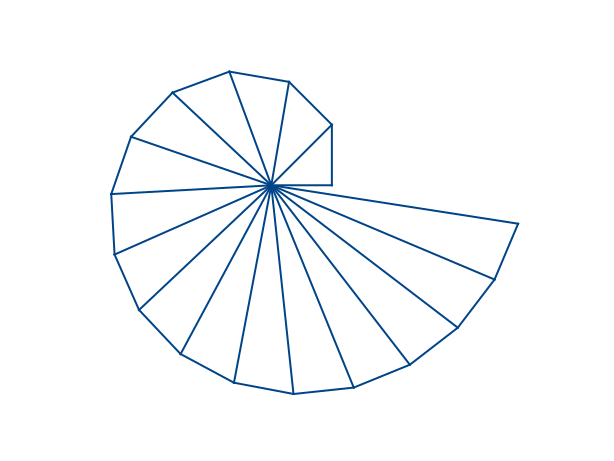
Spiral of TheodorusWe stopped the construction where we did because the next triangle to be added would overlap the first triangle, which would clutter the image. But we could certainly have kept going.

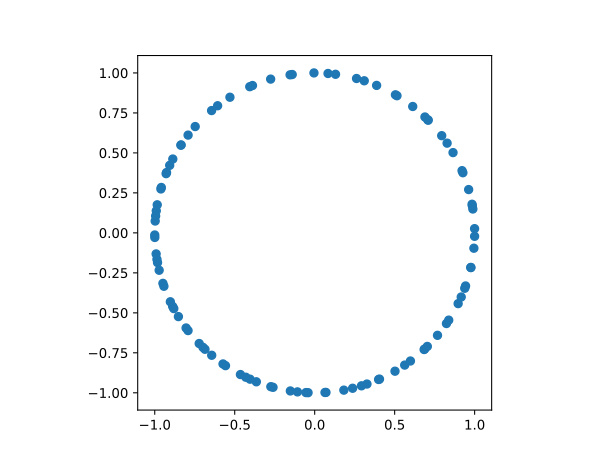
If we do keep going, then the set of hypotenuse angles will be dense in the circle, with no repeats.

The nth triangle has sides of length 1 and √n, and so the tangent of nth triangle’s acute angle is 1/√n. The angle formed by the nth hypotenuse is thus

arctan(1) + arctan(1/√2) + arctan(1/√3) + … + arctan(1/√n).

Here’s a plot of the first 99 hypotenuse angles.
Angles formed by hypotenuses in spiral of Theodorus

Here’s the code that produced the plot.

    from numpy import *
    import matplotlib.pyplot as plt

    plt.axes().set_aspect(1)

    N = 100
    theta = cumsum(arctan(arange(1,N)**-0.5))
    plt.scatter(sin(theta), cos(theta))
    plt.savefig("theodorus_angles.svg")

If we change N to 500 we get a solid ring because the angles are closer together than the default thickness of dots in a scatterplot.


from John D. Cook https://ift.tt/2GMlaxL
via IFTTT

Comments

Popular posts from this blog

Controlling legend appearance in ggplot2 with override.aes

[This article was first published on Very statisticious on Very statisticious , and kindly contributed to R-bloggers ]. (You can report issue about the content on this page here ) Want to share your content on R-bloggers? click here if you have a blog, or here if you don't. In ggplot2 , aesthetics and their scale_*() functions change both the plot appearance and the plot legend appearance simultaneously. The override.aes argument in guide_legend() allows the user to change only the legend appearance without affecting the rest of the plot. This is useful for making the legend more readable or for creating certain types of combined legends. In this post I’ll first introduce override.aes with a basic example and then go through three additional plotting scenarios to how other instances where override.aes comes in handy. Table of Contents R packages Introducing override.aes Adding a guides() layer Using the guide argument in scale_*() Changing multiple aesthetic par...

Using RStudio and LaTeX

(This article was first published on r – Experimental Behaviour , and kindly contributed to R-bloggers) This post will explain how to integrate RStudio and LaTeX, especially the inclusion of well-formatted tables and nice-looking graphs and figures produced in RStudio and imported to LaTeX. To follow along you will need RStudio, MS Excel and LaTeX. Using tikzdevice to insert R Graphs into LaTeX I am a very visual thinker. If I want to understand a concept I usually and subconsciously try to visualise it. Therefore, more my PhD I tried to transport a lot of empirical insights by means of  visualization . These range from histograms, or violin plots to show distributions, over bargraphs including error bars to compare means, to interaction- or conditional effects of regression models. For quite a while it was very tedious to include such graphs in LaTeX documents. I tried several ways, like saving them as pdf and then including them in LaTeX as pdf, or any other file ...