
on arithmetic derivations of square roots

[This article was first published on R – Xi'an's Og, and kindly contributed to R-bloggers]. (You can report issue about the content on this page here)
Want to share your content on R-bloggers? click here if you have a blog, or here if you don't.

An intriguing question made a short-lived appearance on the CodeGolf section of Stack Exchange, before being removed, namely the (most concise possible) coding of an arithmetic derivation of the square root of an integer, S, with a 30 digit precision and using only arithmetic operators. I was not aware of the myriad of solutions available, as demonstrated on the dedicated WIkipedia page. And ended playing with three of them during a sleepless pre-election night!

The first solution for finding √S is based on a continued fraction representation of the root,
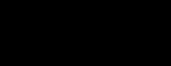
\sqrt{S}=a+\cfrac{r}{2a+\cfrac{r}{2a+\ddots}}

with a²≤S and r=S-a². It is straightforward to code-golf:

while((r<-S-T*T)^2>1e-9)T=(F<-2*T+r/(2*T+F))-T;F

but I found it impossible to reach the 30 digit precision (even when decreasing the error bound from 10⁻⁹). Given the strict rules of the game, this would have been considered to be a failure.

The second solution is Goldschmidt’s algorithm

b=S
T=1/sum((1:S)^21e-9){
  b=b*T[1]^2
  T=c((3-b)/2,T)}
S*prod(T)

which is longer for code-golfing but produces both √S and 1/√S (and is faster than the Babylonian method and Newton-Raphson). Again no luck with high precision and almost surely unacceptable for the game.

The third solution is the most interesting [imho] as it mimicks long division, working two digits at a time (and connection with Napier’s bones)

`~`=length
D=~S
S=c(S,0*(1:30))
p=d=0
a=1:9
while(~S){ 
  F=c(F,x<-sum(a*(20*p+a)<=(g<-100*d+10*S[1]+S[2])))
  d=g-x*(20*p+x)
  p=x+10*p
  S=S[-1:-2]}
sum(10^{1+D/2-1:~F}*F)

plus providing an arbitrary number of digits with no error. This code requires S to be entered as a sequence of digits (with a possible extra top digit 0 to make the integer D even). Returning one digit at a time, it would further have satisfied the constraints of the question (if in a poorly condensed manner).

To leave a comment for the author, please follow the link and comment on their blog: R – Xi'an's Og.

R-bloggers.com offers daily e-mail updates about R news and tutorials about learning R and many other topics. Click here if you're looking to post or find an R/data-science job.
Want to share your content on R-bloggers? click here if you have a blog, or here if you don't.

The post on arithmetic derivations of square roots first appeared on R-bloggers.


from R-bloggers https://ift.tt/3ngyv4n
via IFTTT

Comments

Popular posts from this blog

Controlling legend appearance in ggplot2 with override.aes

[This article was first published on Very statisticious on Very statisticious , and kindly contributed to R-bloggers ]. (You can report issue about the content on this page here ) Want to share your content on R-bloggers? click here if you have a blog, or here if you don't. In ggplot2 , aesthetics and their scale_*() functions change both the plot appearance and the plot legend appearance simultaneously. The override.aes argument in guide_legend() allows the user to change only the legend appearance without affecting the rest of the plot. This is useful for making the legend more readable or for creating certain types of combined legends. In this post I’ll first introduce override.aes with a basic example and then go through three additional plotting scenarios to how other instances where override.aes comes in handy. Table of Contents R packages Introducing override.aes Adding a guides() layer Using the guide argument in scale_*() Changing multiple aesthetic par...

Using RStudio and LaTeX

(This article was first published on r – Experimental Behaviour , and kindly contributed to R-bloggers) This post will explain how to integrate RStudio and LaTeX, especially the inclusion of well-formatted tables and nice-looking graphs and figures produced in RStudio and imported to LaTeX. To follow along you will need RStudio, MS Excel and LaTeX. Using tikzdevice to insert R Graphs into LaTeX I am a very visual thinker. If I want to understand a concept I usually and subconsciously try to visualise it. Therefore, more my PhD I tried to transport a lot of empirical insights by means of  visualization . These range from histograms, or violin plots to show distributions, over bargraphs including error bars to compare means, to interaction- or conditional effects of regression models. For quite a while it was very tedious to include such graphs in LaTeX documents. I tried several ways, like saving them as pdf and then including them in LaTeX as pdf, or any other file ...